
Breaking Down Model Context Protocol (MCP): Everything You Need to Know
Imagine you are sitting at your desk, sipping your morning coffee, and staring blankly at your computer screen. You have an incredible ai agent ready to assist you.
You type a brilliant prompt, asking it to summarize a massive financial report sitting on your hard drive. But instead of a helpful answer, you hit a massive brick wall.
I remember the exact moment I almost threw my laptop out the window. I had just spent two hours trying to get my smart assistant to read my messy project folders, only to realize I was wasting more time manually copying data than actually doing real work. That was my painful wake-up call, and it pushed me to find a system that actually connects to my files without making me want to pull my hair out.
The machine simply cannot see your files. It lacks a direct local data connection. You suddenly feel a rush of frustration because you know the technology is smart enough, but it just cannot reach the information it needs.
This is the hidden struggle thousands of professionals face every single day. We are surrounded by incredibly smart assistants like chatGPT and GoogleGemini. Yet, getting them to securely read our personal documents or interact with our private databases feels like trying to speak to someone through a thick, soundproof glass wall.
You end up copying and pasting huge blocks of text manually. You waste precious hours formatting data just so the machine can understand it. Your mental peace slowly drains away as you juggle multiple tabs, messy scripts, and unreliable third-party plugins.
Why should a simple local data connection be this difficult? Why does AI model integration always feel like a complicated science experiment?
Many users try to build custom bridges using heavy coding. But these custom solutions break easily. Whenever a company updates their system, your hard-earned setup collapses.
You lose time, you lose patience, and you lose trust in the very tools designed to make your life easier. This lack of universal API standards is causing daily headaches for writers, developers, and everyday computer users alike.
We clearly need a better way. We need a system that acts like a universal translator between our private files and these powerful external brains.
Decoding the Magic: What Makes Things Connect?
To fix this massive headache, the tech world quietly introduced something revolutionary. It is called the Model Context Protocol (MCP).
At its core, the Model Context Protocol (MCP) is an open-source standard designed to connect intelligent systems to your private data sources safely. Think of it as a highly secure, standardized bridge.
Instead of building a unique, wobbly bridge every time you want to connect a new tool, you now have a solid, universal highway. This highway relies on universal API standards that everyone can follow.
Let us break this down into simple, practical steps so you can understand exactly how to apply this logic to your own daily workflow.
The Architecture of a Seamless Connection
Whenever you type a prompt into a smart chat interface, a complex journey begins behind the scenes. Before this new system existed, the machine was isolated on an island.
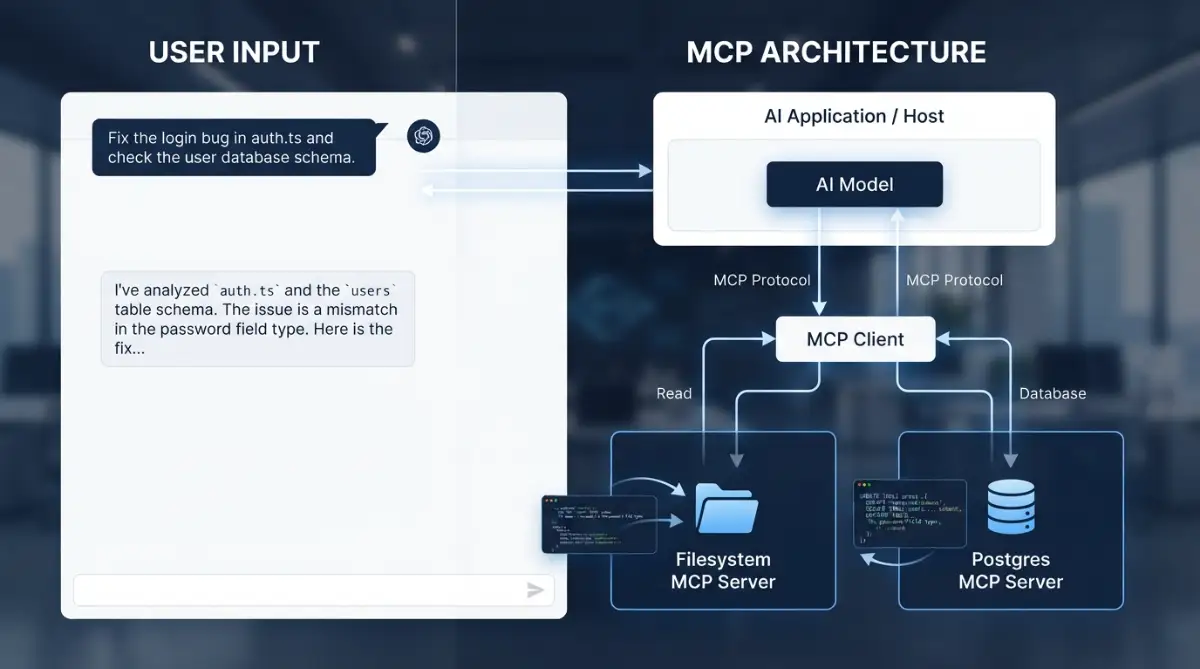
Now, with a proper AI model integration, the system operates using three main components. Let us look closely at how these parts work together in perfect harmony.
First, you have the Host. The Host is the application you are actually looking at on your screen.
If you are using a smart editor or a custom ai agent, that interface is the Host. The Host is responsible for taking your human instructions and preparing them for the next step.
Next, we have the Client. The Client acts like a highly trained messenger.
The Client takes the request from the Host and runs across the bridge. Its only job is to find the right information without messing anything up. This ensures seamless tool execution every single time you hit the enter key.
Finally, we have the Servers. These are small, lightweight programs sitting right next to your private data.
When the Client arrives, it politely asks the Server for specific information. Because they communicate using strict secure environment protocols, the Server only hands over exactly what was requested. Nothing more, nothing less.
Why This Changes Your Daily Workflow
Let us look at a real-life scenario. Suppose you are managing a large project and collaborating with your team.
You are using a shared digital workspace. Managing this type of cloud cowork setup requires incredible organization.
You want to ask your digital assistant a question about a specific client. In the past, you would have to download the client's file, open it, copy the contents, and paste it into the chat window.
Now, thanks to this standardized protocol, things are entirely different. Your assistant simply uses its local data connection to read the client file directly from your secure database.
It happens instantly. There is no copying, no pasting, and zero risk of accidentally leaking sensitive information onto the public internet. This level of AI model integration gives you your valuable time back.
Expert Insight: The Power of Open Standards
"When developers agree on a single way to communicate, magic happens. We stop wasting time fixing broken connections and start building tools that actually help people."
This quote perfectly captures why universal API standards matter. When everyone speaks the same language, the entire ecosystem thrives.
Imagine if every brand of television required a completely different type of electrical outlet. It would be chaos.
By standardizing how data flows, developers can create secure environment protocols that protect you. You can confidently link your private notes, your code repositories, and your financial sheets without fear.
Setting Up Your First Data Bridge
How do you actually use this in your daily life? It is surprisingly simple.
You do not need to be a senior programmer to benefit from this technology. You just need to choose applications that support these new communication rules.
Let us say you are experimenting with modern tools like gamma ai for creating presentations. You might also be testing out chatGPT for writing emails.
Maybe you even prefer Cloude for analyzing large documents, or GoogleGemini for fast research.
Regardless of which tool you prefer, the goal remains the same. You want a smooth, reliable local data connection.
To start, you will install a small "Server" application on your computer. This Server acts as the gatekeeper for your files.
If you want your intelligent assistant to read your computer's file system, you install a file system server. It takes about two minutes and requires zero complex coding.
Once installed, you tell your main application to talk to this new server. The two systems shake hands, agree on the secure environment protocols, and the bridge is open.
If you are a visual learner, watch this quick video breakdown below to see exactly how this data bridge connects in real time. After watching, keep reading to learn how to avoid the hidden security traps that most beginners accidentally fall into!
Myth vs Reality in Modern Connectivity
Let us clear up some common confusion. Many people have misunderstandings about how these systems actually handle private information.
Myth: Giving a machine access to my local files means it can read everything on my computer.
Reality: Absolutely not. The system uses strict secure environment protocols. You define exactly which folders it can see. It cannot look at anything outside of those specific folders.
Myth: I need to know advanced programming to use this.
Reality: Modern tools make this process visual and easy. Setting up a local data connection often just requires clicking a few buttons and approving permissions.
Myth: This only works for massive corporate databases.
Reality: It is designed for everyone. Whether you are managing a massive cloudDesign project or just organizing your personal grocery lists, universal API standards work exactly the same way.
Expanding the Capabilities with Tools
One of the most exciting features of this system is the ability to use external tools automatically. We call this seamless tool execution.
Imagine you ask your assistant to check the current weather in Tokyo and then save that information into a text file on your desktop.
Without a proper protocol, the assistant would just give you the weather and ask you to create the file yourself. It is helpful, but not completely autonomous.
With this new protocol, the assistant can reach out, grab the weather data, and then ask your local server to write the text file.
This seamless tool execution turns a simple chat interface into a powerful command center. It bridges the gap between just talking about doing something and actually getting it done.
The Role of Prompts and Context
Let us talk about how you communicate. A good prompt is essential for getting good results.
When you provide clear instructions, the system knows exactly which server to ask for help.
For example, if you are working on a creative project, you might use gamma ai or plain gamma to generate visual ideas.
If you need heavy data analysis, you might rely on GeminiSpark or Cloude.
By giving a detailed instruction, you provide the necessary context. The Model Context Protocol (MCP) takes your instruction and packages it perfectly for the receiving server.
Because the system relies on universal API standards, the context is never lost in translation. The server receives the exact instruction, understands the goal, and returns the precise data needed.
Organizing Your Digital Workspace
To truly benefit from this, you need to keep your digital space clean. A messy hard drive will only confuse the system.
If you are setting up a workspace for cloud cowork, ensure your folders are clearly named.
When you establish a local data connection, point the server to highly organized directories. This makes AI model integration much smoother.
Think of it like inviting a very smart librarian into your home. If your books are scattered all over the floor, the librarian will struggle to find anything.
If your books are neatly arranged on shelves, the librarian can find exactly what you need in seconds. Good cloudDesign principles apply directly to your local file management.
Understanding Security and Permissions
We must talk about safety. Opening up your private files can feel intimidating.
This is why secure environment protocols are built into the very foundation of this system.
Every single time an external system wants to read or write a file, it must ask for permission. You, as the human user, remain in total control.
You can set rules that say, "You may read these files, but you are never allowed to delete or change them."
This level of control ensures seamless tool execution without risking your important data. It gives you the confidence to explore new workflows securely AI model integration universal API standards local data connection secure environment protocols seamless tool execution
The Future of Personal Assistants
As we look forward, the lines between different brands are starting to blur.
Whether you are a fan of chatGPT, heavily invested in GoogleGemini, or exploring niche tools like GeminiSpark, the underlying plumbing is becoming the same.
This standardization means you do not have to lock yourself into one ecosystem. You can mix and match the best parts of different systems.
You can use one tool for writing, another for coding, and a third for generating gamma style presentations.
They will all be able to read your local context because they all respect the same universal API standards. This is true freedom for the modern computer user.