
Claude vs ChatGPT: 8 Hidden Features You Are Completely Missing Out On
Imagine sitting at your desk at 11:30 PM, your eyes burning from staring at the screen. You just copied and pasted a massive 50-page financial report into your favorite smart assistant, asking it to summarize the key points. You hit enter, wait a few seconds, and read the response.
Your heart sinks completely. The tool completely forgot the first 20 pages of your document and is now making up random facts to fill in the blanks. This is one of the most common ChatGPT limitations that ordinary people face every single day. You try breaking the text into smaller chunks, but now you have lost the flow and wasted an entire hour of your valuable time.
This daily struggle creates extreme mental fatigue for professionals, students, and freelancers who rely on technology to save time. When your tools fail to remember basic instructions, you feel like you are managing a forgetful intern rather than using advanced AI models. The constant need to repeat yourself, fix silly mistakes, and double-check every single output destroys your peace of mind.
I still remember tearing my hair out last month when a tight client deadline was just two hours away, and my usual AI assistant kept forgetting the first half of my 60-page PDF. I felt completely defeated, manually copying and pasting tiny paragraphs for hours while my coffee went cold. That exact nightmare forced me to look for a better solution, and honestly, making the switch changed my daily work life forever.
You might even be using a cloud cowork space to manage remote teams, hoping technology makes your life easier. But when the systems fail, the stress just doubles. Fortunately, there is a much better way to handle these exact problems. By shifting your focus to specific Claude features, you can stop fighting with your tools and start getting actual work done.
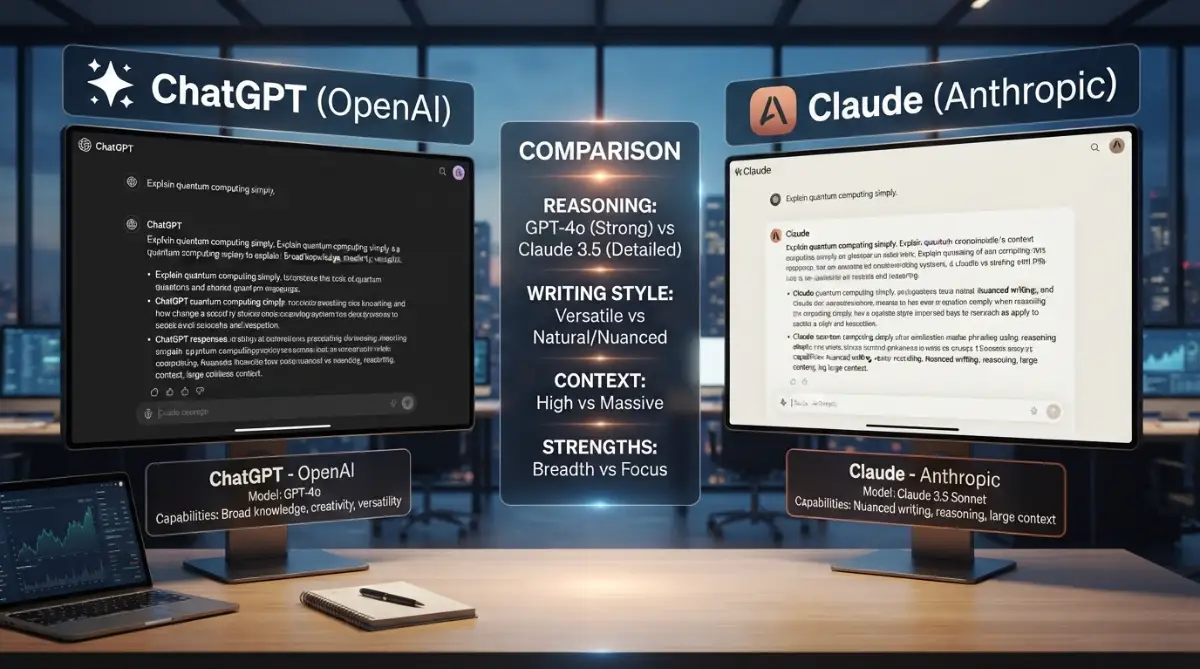
Beyond Ordinary: The Secret Powers You Are Missing Out On
If you are tired of repeating yourself, it is time to look at a direct AI comparison. The internet is full of generic advice, but we need to look at actual, practical solutions you can use right now. Let us explore the eight amazing things that make a massive difference in how you work every day.
1. Swallowing Massive Files Without Losing Memory
One of the biggest headaches in modern work is reading long files, contracts, or books. Most systems have a strict memory limit, meaning they simply forget the beginning of a conversation by the time you reach the end. This is where a proper document analysis AI changes the entire game for you.
When you upload a giant PDF, you need a system that reads every single word and keeps it in active memory. You can upload entire books, dozens of legal contracts, or massive research papers all at once. The system does not just scan them; it understands the exact context of page 1 and connects it perfectly to page 300.
Real-Life Scenario:
Let us say you are an accountant doing a deep financial review. You upload a 100-page tax history and ask for a specific deduction mentioned on page 12. Unlike older tools that guess the answer, this document analysis AI pulls the exact quote instantly. You save hours of scrolling and highlighting.
Pro Tip for Daily Use:
Always bundle your documents before uploading. If you have five related PDFs, drop them in together rather than one by one. This helps the system build a complete picture of your project instantly.
2. Following Complex Brand Voices Perfectly
Writing emails or blog posts that actually sound like you is incredibly difficult. A major part of ChatGPT limitations is that the output often sounds robotic, stiff, or overly dramatic. No matter how much you tweak the prompt, you still get words that no normal human uses in daily life.
With specific Claude features, the system actually listens to the tone you ask for. If you want a friendly, casual email to a client, it writes exactly that. It does not force big, unnecessary words into every single sentence AI comparison ChatGPT limitations advanced AI models document analysis AI
Myth vs Reality:
- Myth: All smart writing tools sound exactly the same.
- Reality: Different systems have different default personalities. Some are trained to be highly conversational and naturally mimic human speech patterns.
Practical Step to Try Today:
Give the system a sample of your own writing first. Tell it, "Read my writing style in this text, and then write a new email using the exact same tone." You will be shocked at how human the final result sounds.
3. Writing and Understanding Code Like a Senior Developer
Even if you are not a programmer, you might need help building a simple website or fixing a broken formula in Excel. In any honest AI comparison, you will find that basic tools often write messy code that breaks when you try to use it. They give you half of the solution and expect you to figure out the rest.
When you use claude code, the experience feels like sitting next to a patient senior developer. It does not just spit out a block of text; it explains exactly where to put it and how it works. If an error happens, it understands the mistake and fixes it immediately without getting confused.
- Clean Output: The code generated is highly organized and well-documented.
- Contextual Fixes: If you paste a massive error log, it reads the whole thing and points directly to the single broken line.
- Beginner Friendly: It uses simple English to explain complex technical steps.
Imagine you are trying to build an ai agent for your customer service team. You need a script that connects your website to a database. Using claude code, you get a complete, working script on the first try, saving you from expensive developer fees.
4. Creating Visual Dashboards and Artifacts
If you want to see exactly how these interactive visual dashboards look and work in real time, watch this quick video demonstration below before we jump into the next amazing feature.
Sometimes, reading a plain wall of text is incredibly boring and unhelpful. You ask for a business plan, and you get 50 paragraphs of plain text. You then have to spend hours copying that text into presentation tools like gamma ai or basic gamma templates just to make it look decent.
A massive advantage over ChatGPT limitations is the ability to generate standalone visual windows. When you ask for a code snippet, a flowchart, or a website wireframe, the system creates a dedicated visual box on your screen. You can actually see the preview of the website or chart right there in the chat.
How This Helps You Work Faster:
- You ask for a project timeline.
- The system builds a beautiful, interactive chart on the side of your screen.
- You can edit this chart without losing your main chat conversation.
If you are working on cloudDesign projects, this feature is a complete lifesaver. You can generate HTML and CSS and immediately see how your cloudDesign layout looks without opening a separate code editor.
5. Highly Accurate Data Extraction from Messy Tables
We all hate dealing with messy, disorganized data. Sometimes a client sends you a PDF table that is completely broken, with numbers and names mixed up in the wrong columns. If you try to extract this using older tools, the columns get even more jumbled, creating a massive headache.
A high-quality document analysis AI thrives on messy data. You can give it the worst, most poorly formatted PDF table, and it will perfectly align every single row and column. It understands the visual layout of the text, not just the raw words.
Step-by-Step Data Cleanup:
- Take a screenshot of the messy table.
- Upload the image directly into the chat.
- Use a simple prompt like: "Turn this image into a clean markdown table."
- Copy the perfect result directly into Excel.
This level of precision is exactly what sets advanced AI models apart from basic chatbots. You do not need to be a data scientist to organize your weekly reports anymore.
6. Refusing to Output Harmful or Lazy Responses
Nothing is more annoying than asking a direct question and getting a lazy, generic answer. In many AI comparison tests, basic tools will often say, "As an AI, I cannot do this," simply because the request is slightly complex. They take the easy way out instead of actually trying to solve your problem.
One of the most powerful Claude features is its deep commitment to actually helping you, while remaining completely safe. It rarely gives you lazy, generic refusals. If it cannot do something exactly the way you asked, it will immediately offer a very close alternative solution.
The Difference in Safety:
- Other tools: "I cannot write this because it violates my policy."
- This tool: "I cannot write it exactly like that, but here is a highly professional way to address your problem safely and effectively."
This means your workflow never stops completely. You always get a usable starting point, which is incredibly helpful when managing a busy cloud cowork schedule AI comparison advanced AI models document analysis AI smart workspace.
7. Superior Context Recall in Endless Conversations
Have you ever had a brilliant brainstorming session with a chatbot, only for it to completely forget your main goal 20 minutes later? This is a massive issue when you are planning long-term projects. You end up wasting time reminding the system about the rules you set at the very beginning.
With advanced AI models, the memory recall is simply flawless. You can have a conversation that lasts for days, covering dozens of different topics. When you refer back to a small detail you mentioned on Monday, the system remembers it perfectly on Friday.
Comparison Table: Memory Management
This makes acting as an ai agent much more practical. You can train the chat once, leave it open in your browser, and keep returning to it as your dedicated digital assistant all week long.
8. Better Nuance in Analyzing Competitor Models
The tech industry changes every single week, and comparing tools can be exhausting. You might hear about new updates like GoogleGemini or the rumored GeminiSpark framework and wonder how they stack up. When you ask basic chatbots to compare themselves to others, they give highly biased or vague answers.
A standout feature of this system is its objective, highly nuanced reasoning. It does not just praise itself blindly. If you ask it to compare its abilities to GoogleGemini or the GeminiSpark updates, it will give you a remarkably honest breakdown. It will tell you exactly where it excels and where another tool might actually be better for your specific task.
Why Honesty Matters in Tech:
When you are spending money on software, you need facts, not marketing fluff. Having an assistant that can objectively analyze data saves you from making bad business decisions. It acts as an unbiased consultant rather than a pushy salesperson.
9. Managing Multiple File Types Without Crashing
Let us talk about file management. Often, your project exists across multiple different formats. You might have a Word document, a CSV spreadsheet, and a Python script all related to the same exact task. Most people struggle because they have to process these files one at a time.
A true document analysis AI allows you to drop all of these completely different file types into the chat at the exact same time. You can say, "Read the numbers in the CSV, apply the rules from the Word document, and update the Python script accordingly."
The Ultimate Time Saver:
This multi-format digestion is heavily missing in standard ChatGPT limitations. Instead of spending three hours acting as a middleman between your own files, you let the system do the heavy lifting. You can immediately take the final output and plug it into your gamma ai presentation or basic gamma slides for your next big meeting.
10. Generating Highly Specific Formatting
Formatting text exactly the way you need it is surprisingly hard. You might need your text formatted in strict JSON, perfectly aligned markdown, or a highly specific XML structure for your database. Most tools struggle to maintain strict formatting, often sneaking in random markdown symbols that break your code.
Claude features include an intense attention to formatting rules. If you demand that there should be absolutely no conversational text before or after your code, it obeys perfectly. You do not get the annoying "Here is your code!" message at the top, which means you can directly copy and paste the output into your software.
Pro Tip for Developers:
Always use a strict prompt like: "Output only the raw JSON. Do not include any greetings, explanations, or markdown blocks." The system will give you the pure data you requested, making your automated workflows run incredibly smooth document analysis AI advanced AI models Claude features ChatGPT limitations AI comparison
11. Creating Interactive Educational Tools on the Fly
Learning a new skill requires practice, not just reading. If you want to learn a new language or understand complex math, reading a static paragraph is rarely enough. You need something that tests your knowledge and gives you instant, personalized feedback.
With the unique visual artifact system, you can actually ask the AI to build a mini flashcard app right inside the chat window. It will generate the code, render the visual app, and let you click buttons to test yourself. You are literally creating personalized software in seconds.
Real-Life Application:
- You are studying for a medical exam.
- You upload your massive textbook chapters.
- You ask the system to build an interactive quiz based purely on the uploaded text.
- You practice clicking the answers and getting instant corrections.
This level of interactivity completely redefines how we study and learn new information, leaving older static text models far behind.
12. Deep Empathy in Creative Writing Scenarios
Creative writers, novelists, and marketers face a massive challenge when working with AI. They need characters that feel real, emotions that feel genuine, and dialogue that flows naturally. Standard AI tools are notorious for writing extremely cheesy, predictable, and dramatic dialogue that ruins the story.
When you dive into advanced AI models, the difference in creative writing is staggering. The system understands the subtle human emotions behind the text. It knows how to show an emotion rather than just loudly stating it.
A Simple Writing Comparison:
- Basic AI: "John was very angry. He yelled loudly because he was sad about the broken cup."
- Advanced System: "John stared at the shattered pieces on the floor, his jaw tight. He slowly swept them up, not saying a single word."
This nuanced understanding makes it the ultimate co-writer for anyone trying to draft compelling stories, engaging emails, or highly persuasive sales pages. You no longer have to spend hours deleting robotic adjectives from your final drafts.
13. Flawless Translation with Cultural Context
Translating words from one language to another is easy. Translating the actual meaning, humor, and cultural context is incredibly difficult. Most basic translation apps give you literal translations that sound completely ridiculous to native speakers.
When conducting an honest AI comparison, you will see that this system excels at cultural adaptation. If you give it a funny English idiom and ask it to translate it to Japanese, it will not just translate the words. It will find the equivalent Japanese idiom that carries the exact same emotional weight and humor.
This is incredibly important for global businesses. If you are communicating with international clients, a culturally blind translation can actually offend someone and ruin a business deal. Having a culturally aware assistant ensures your message is always received perfectly.
14. Advanced Math and Logic Problem Solving
Many people assume that because AI can write poetry, it must be great at math. This is a huge trap. Language models naturally struggle with deep logic and complex mathematical reasoning. They often hallucinate numbers and give you a wildly incorrect final answer with extreme confidence.
Through careful design, this specific system has been trained to break down complex logic puzzles step by step. Instead of guessing the final answer immediately, it creates a structured workspace to solve the problem systematically.
How to get the best results:
Always ask the system to "think step by step" before giving the final answer. By forcing it to write out its mathematical logic, you drastically reduce the chance of errors. You can rely on it for complex budget forecasting, statistical analysis, and deep logical reasoning without constantly fearing hidden mistakes.
15. The Perfect Assistant for Daily Life Management
Beyond just coding and writing, you need a tool that actually helps organize your messy daily life. From planning a massive family vacation to organizing a strict weekly meal plan based on specific allergies, the deep context window handles personal tasks beautifully.
You can upload your family's crazy schedule, a list of dietary restrictions, and your strict budget all at once. The system will look at all these different rules and generate a flawless, perfectly organized weekly plan that respects every single constraint.
This goes far beyond just answering questions. It is about taking the mental load off your shoulders and letting a highly capable system do the heavy lifting for you. You get to enjoy your free time while the technology organizes the chaos in the background.
Taking Total Control: Expert Strategies for Daily Success
Once you understand the basic differences between these smart tools, you need a plan to actually use them effectively. Many people learn about these amazing features but go right back to their old, slow habits by the next morning. If you want to permanently change how you work, you must adopt a few professional strategies.
Building a smart system is completely different from just asking random questions. You want to turn this technology into a reliable partner that knows your exact needs. This means setting up specific rules and workflows that run on autopilot every single time you log in.
Let me share exactly how top professionals use these advanced systems to save hours every week. These are not complicated technical tricks. They are simple, practical habits you can start building right now.
The "Master Prompt" Technique
Most users make the mistake of typing fresh instructions every single day. If you are writing a weekly newsletter, you probably tell the AI your target audience, your tone, and your formatting rules every single time. This is a massive waste of energy and often leads to inconsistent results.
Instead, you need to create a single "Master Document" saved on your computer. This document should hold your exact brand voice, your strict formatting rules, and examples of your best past work. When you start a new chat, you simply upload this master document first.
You just tell the system, "Read my master rules before we begin." Because the document analysis AI has a flawless memory, it will apply those exact rules to everything you do in that session. You completely eliminate the need to repeat yourself, making your workflow incredibly smooth.
I used to waste at least twenty minutes every single morning typing the exact same formatting rules over and over again because I thought that was just how AI worked. Once I realized I could just upload one master document with all my personal preferences, it honestly felt like I had hired a real human assistant who actually listens.
Building Your Own Custom AI Agents
You do not need to be a software engineer to build an automated assistant. You can act as your own developer by simply assigning strict roles to the system. You can tell the chat to act exclusively as your financial advisor, your strict coding tutor, or your creative writing editor.
When you give the system a very specific identity, its answers become much sharper. For instance, if you are working on complex programming, learning how to write perfect claude code changes the entire experience. You stop getting generic advice and start getting exact, ready-to-use scripts.
A Real-Life Agent Scenario:
- The Setup: You open a fresh chat window.
- The Command: "You are now a senior marketing manager. You will only give me advice based on direct response copywriting. Do not use corporate jargon."
- The Result: The system completely drops its robotic tone and gives you sharp, aggressive, and highly effective marketing copy.
You can keep this specific chat window open all week. Whenever you need marketing advice, you just drop your ideas into that specific window. You have essentially created a free, highly skilled ai agent that never forgets its job description.
Creating Visual Workflows from Scratch
We mentioned earlier that you can create beautiful visual windows right inside the chat. To get the most out of this, you should start asking for interactive dashboards instead of plain text lists. If you are planning a massive project, plain text is simply too hard to read.
Ask the system to generate a complete visual timeline for your project. You can actually see the color-coded progress bars and interactive lists right on your screen. When you are happy with the layout, you can easily export this data to use in tools like gamma ai or your favorite slide builder.
If you want to understand how these massive context windows actually hold all this data without breaking, you can look at recent studies on long-context language models. The technology behind the scenes is specifically designed to keep your visual data perfectly organized, no matter how many changes you make.
Connecting the Dots Across Multiple Projects
Let us say you manage a busy cloud cowork space. You have billing spreadsheets, member complaints in a Word document, and a schedule in a PDF. Managing all of these different pieces manually takes hours of copying and pasting.
The smartest thing you can do is upload all three completely different files into one single prompt. Ask the system to find the connections for you. Tell it to "Find the members who complained the most in the Word document, and check their billing status in the spreadsheet."
Why This Works:
The system perfectly cross-references the data for you. It does the boring analytical work in seconds, handing you a neat summary of exactly who you need to contact. This is the exact moment you realize you are holding a supercomputer, not just a chatbot.

The Hidden Traps That Completely Ruin Your Workflow
Even with the most powerful tools in the world, human error can quickly ruin the entire experience. It is very easy to fall back into lazy habits, especially when you are tired or rushing to meet a tight deadline. When you use these systems incorrectly, you end up creating more work for yourself.
I see smart professionals making the exact same mistakes every single day. They get frustrated, blame the technology, and cancel their subscriptions. But the truth is, the technology is rarely the problem. The real issue is how people talk to the machine.
Let us look at the most common pitfalls that drain your time, waste your money, and destroy your mental peace. If you avoid these specific traps, your daily productivity will skyrocket.
Treating a Supercomputer Like a Basic Search Engine
The absolute biggest mistake you can make is treating this advanced system like a simple Google search bar. People constantly type three-word commands like "Write an email" or "Fix this code." They hit enter and then get angry when the result is completely generic and boring.
When you type lazy instructions, you force the system to guess what you actually want. And when a machine guesses, it always defaults to the safest, most robotic sounding response possible. You are essentially driving a high-speed sports car in a crowded grocery store parking lot.
The Emotional Cost of Laziness:
Every time you send a lazy prompt, you have to read the bad response, get frustrated, and write another prompt to fix it. You repeat this cycle five times until you finally get a decent answer. You just wasted 20 minutes doing something that should have taken exactly 30 seconds.
Blindly Trusting the Final Output
We all know about standard ChatGPT limitations when it comes to making up fake facts. While the newer, more advanced models are significantly better, they are still not perfect. You can never, ever turn off your own critical thinking when reviewing the final output.
This is especially dangerous when you are using claude code for a live website or relying on financial math for a big client presentation. If you just copy and paste a giant block of text without reading it, you are putting your own professional reputation at massive risk.
According to deep research on cognitive automation errors, blindly trusting automated outputs is the number one cause of professional embarrassment. Always read the final draft. Always test the code before it goes live. You are the final editor, and the machine is just your fast-drafting intern.
Mixing Up Wildly Different Topics in One Chat
Because the memory capacity is so huge, people often get extremely lazy with their chat windows. They will ask a question about Python coding, and then in the exact same chat, they will ask for a recipe for chocolate chip cookies. Ten minutes later, they ask the system to write a professional legal email.
This completely destroys the internal logic of the machine. The system is trying to hold onto the context of your previous messages to help you better. When you violently change the subject, the system gets confused and the quality of your answers drops dramatically.
The Simple Rule to Follow:
Keep your workspaces clean and separated. If you want to know how model context protocol actually works, you will learn that keeping data organized is the key to perfect outputs.
- One chat strictly for coding.
- One chat entirely for creative writing.
- One chat exclusively for data analysis.
Ignoring the Power of Strict Formatting
Another massive trap is accepting messy, plain text answers when you could have beautifully structured data. Many people ask for a list of business ideas and settle for 10 boring bullet points. They then spend an hour moving those points into a proper spreadsheet.
You should always demand strict formatting. If you want data, ask for it in a markdown table. If you want code, ask for it in a clean, copyable block with zero conversational text attached. Do not let the machine give you a friendly "Here is your data!" message if you just need the raw numbers.
When you fail to ask for structured data, you completely miss out on the ability to easily move your work into cloudDesign software or basic gamma templates. Demand exactly what you need, down to the exact file format, and the system will happily obey.
Falling for the "Over-Editing" Illusion
Sometimes, the system gives you a response that is 95% perfect. Instead of just manually changing the last few words yourself, you write another prompt asking the AI to fix a single sentence. The AI rewrites the whole paragraph, and now the tone is completely ruined.
This is a classic trap. You get stuck in an endless loop of prompting, trying to force the machine to write the absolute perfect sentence. You spend more time arguing with the chat window than you would have spent just fixing it yourself.
Do's and Don'ts of Editing:
- Do: Ask the system to rewrite a section if the facts are entirely wrong.
- Do: Provide clear feedback if the tone is completely off.
- Don't: Ask the system to fix a single typo. Just copy the text and fix the typo yourself.
- Don't: Spend 10 minutes writing a prompt for a fix that takes 10 seconds to type manually.
Knowing when to step in and take control manually is the true mark of an expert user. Use the system for the heavy lifting, and use your human touch for the final polish.
Your Blueprint for a Stress-Free Daily Routine
We have covered an incredible amount of ground today. You now understand exactly why relying on older, forgetful tools is holding you back. You have seen how massive memory limits, clean coding abilities, and deep cultural understanding can completely transform the way you do your job.
The days of fighting with robotic text and broken formatting are officially over. You no longer have to settle for basic answers when you have access to a system that can actually read, analyze, and process massive amounts of information perfectly. This is not just a slight upgrade; it is a completely different way of thinking about daily work.
But reading about these features will not change anything unless you actually apply them. You need to close this article and immediately start testing these concepts in your own life. The fastest way to learn is by doing, making mistakes, and refining your own personal style.

A Quick Action Plan for Tomorrow Morning
To make this completely practical, I want you to try a simple experiment tomorrow morning. Do not try to change your entire life all at once. Just follow these three simple steps when you sit down at your desk.
Step 1: The Massive File Test
Find the biggest, most boring PDF document you have been avoiding all week. Upload it entirely into the chat. Ask the system to find the three most important deadlines mentioned in the text. Watch how fast it pulls the exact answers without breaking a sweat.
Step 2: The Perfect Tone Setup
Find an email you wrote recently that you are really proud of. Paste it into a brand new chat window. Tell the system, "Analyze my exact writing style and tone. Now, write a new email to my boss asking for a deadline extension using my exact voice." Read the result and notice the absolute lack of robotic words.
Step 3: The Visual Code Challenge
Even if you do not know anything about programming, ask the system to build a simple interactive calculator using HTML. Tell it to display the visual artifact right on the screen. Click the buttons and realize that you just generated working software in under thirty seconds. If you want to dive deeper, you can always learn the secrets of writing perfect code with Claude.
The Real Secret to Long-Term Success
Technology will always keep changing. You might hear news about updates to GoogleGemini or rumors about a new GeminiSpark engine coming out next week. The specific names of the tools matter much less than the habits you build while using them.
The people who succeed are the ones who treat AI as a collaborative partner, not a magic vending machine. They invest the time to write clear instructions, build strong master rules, and keep their workspaces highly organized. Following guidelines for responsible and effective AI integration ensures you always stay ahead of the curve safely.
You have all the knowledge you need right now to eliminate hours of boring work from your schedule. You have the power to create beautiful documents, write flawless code, and analyze massive amounts of data without feeling overwhelmed.
Stop settling for less. Start demanding more from your tools today, and watch how quickly your daily stress completely disappears. You are fully equipped to take control of your digital workflow starting right this very second.
Looking back, I really wish I had stopped fighting with broken, forgetful tools and made this change much sooner. Give these simple steps a try tomorrow morning with your next big project, and I promise you will be amazed at how much free time you finally get back.
Disclaimer:
The information provided in this article is for educational and informational purposes only. AI systems are constantly updating, and features may change over time. Always verify important data, code, or financial figures generated by any automated system before using them in a professional or commercial setting.


