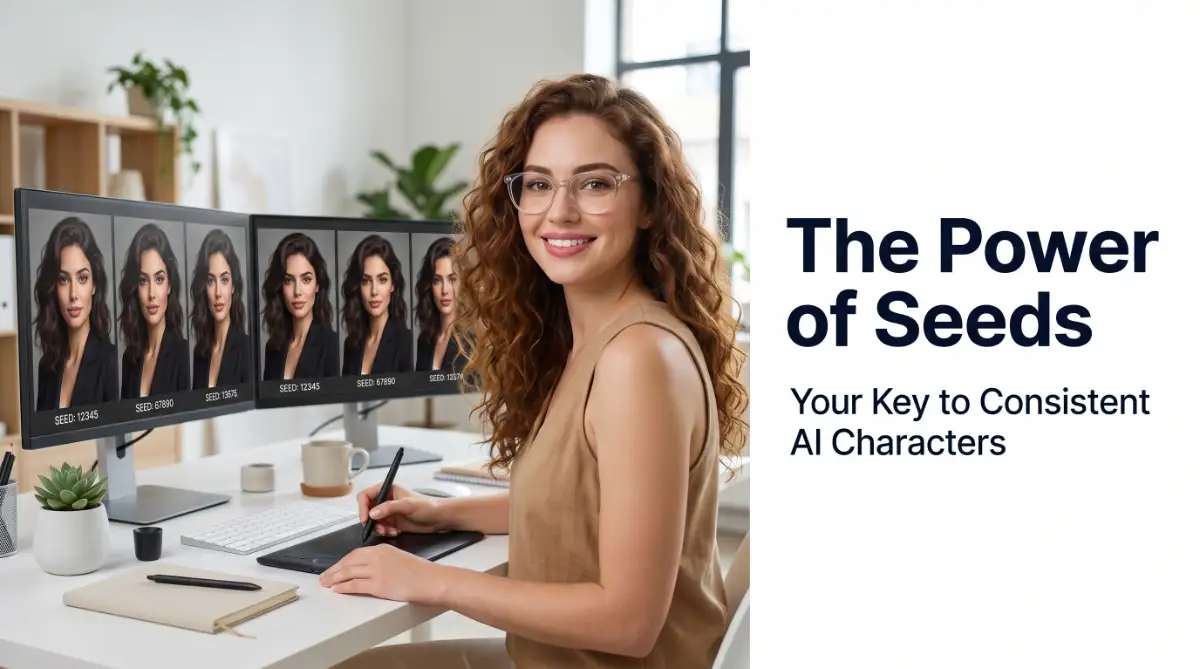
The Endless Loop of Creative Frustration
You spend three hours writing the perfect prompt. Finally, the screen flashes, and you see her.
She is the perfect character for your upcoming children's book or brand story. She has the exact hair, the perfect warmth in her eyes, and a highly specific jacket.
You feel a rush of excitement and immediately write your next prompt to show her walking in a park. You hit enter, wait with high hopes, and then your heart sinks.
The new image shows a completely different girl. Her hair color is slightly off, her jacket is gone, and her face looks like a total stranger.
This is the hidden wall that almost every digital creator hits when they start using AI generators. It is incredibly exhausting to feel like you are gambling with a slot machine every time you click "Generate."
You want to tell a story, build a brand, or design a clean series of matching assets. Instead, you get a collection of beautiful but completely disconnected random faces.
This constant guessing game wastes your precious time and drains your creative energy. You might even start to believe that true visual storytelling is impossible with these new tools.
But there is a simple digital secret that changes everything. It is the silent anchor that keeps your art from drifting away into the random void.
It is called a seed number, and once you learn how to control it, you hold the keys to true creative freedom.

The Secret Code of AI: What is a Seed Number?
To understand how to control your images, we need to lift the curtain on how these generators actually build art.
When you ask an AI to make an image, it does not start with a blank white canvas. It actually starts with a chaotic screen full of random digital static, similar to a television with no signal.
The generator looks at this mess of noise and slowly shapes it into a clear picture based on your text prompt. But where does this initial mess of noise come from?
It comes from a seed number.
The Seed as a Digital DNA
Think of a seed number as the genetic code or the starting blueprint for your image. Every single image generated by an AI has a specific numerical seed attached to it.
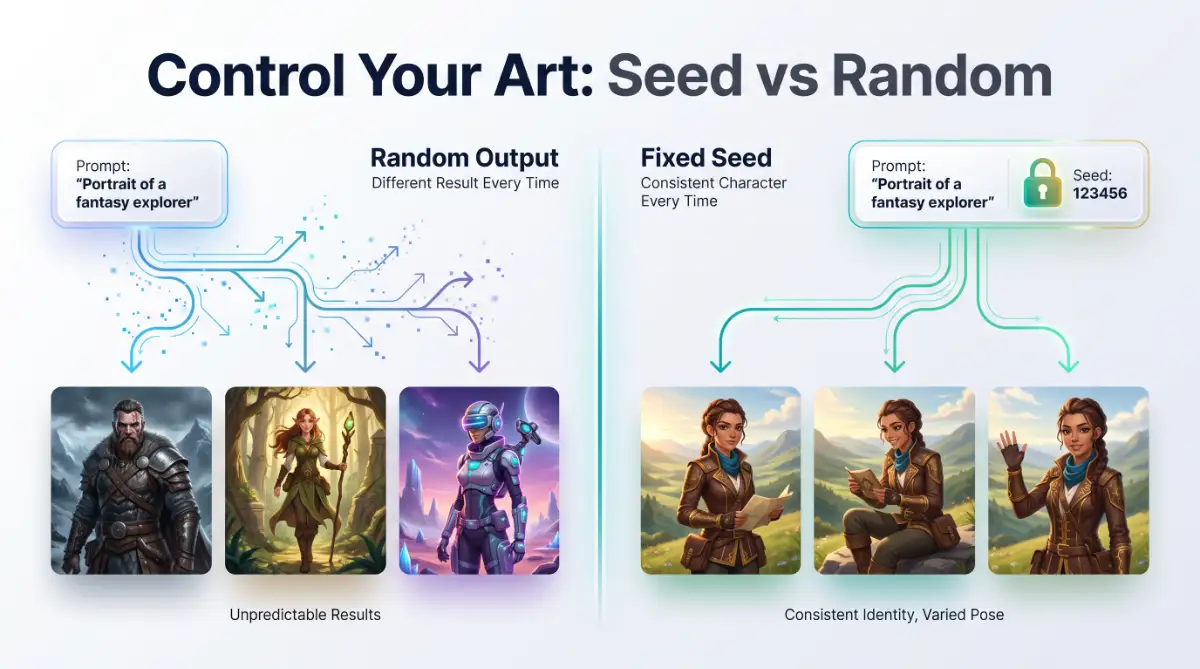
If you do not specify a seed, the generator will pick a massive, random number for you every single time. This is why a simple prompt like "a dog in a red collar" looks completely different every time you run it.
When you let the AI pick random seeds, you are starting with a brand-new pile of static noise for every single generation.
But when you lock the seed number, you force the AI to start with the exact same pile of static noise. This gives you a stable foundation to make subtle, controlled changes.
How Seed Numbers Create Perfect Visual Harmony
Imagine you are baking a specific loaf of bread. If you change your flour, your oven temperature, and your baking pan every day, your bread will never taste the same.
Using seed numbers is like using the exact same recipe, the same oven, and the same pan. You only change one small ingredient at a time.
Let us look at a simple comparison of how seeds affect your workflow.
Seed Settings Comparison
Feature Random Seeds (Default)Locked Seeds (Controlled)Starting Point Completely different noise Identical digital noise Character Face Changes with every generation Remains highly consistent Lighting & Mood Shifts randomly Stays completely uniform Best Used For Brainstorming and exploration Character design & storytelling
As you can see, locking this number transforms your generator from a random toy into a professional design tool.
Step-by-Step Guide to Controlling Seeds Across Top Platforms
Different tools handle seed numbers in their own unique ways. Here is how you can master this process in the most popular image generators.
Mastering Seeds in Midjourney
Midjourney is famous for its gorgeous art, but it can feel incredibly random if you do not know how to find the seeds.
Step 1: Find the Seed of an Image You Love
Once you generate an image grid that you like, you need to ask Midjourney for the seed.
To do this, click the Add Reaction button (the smiley face icon) on the top right of your Discord message. Search for the envelope emoji (✉️) and click it.
Midjourney will instantly send you a private direct message containing the exact Job ID and the seed number.
Step 2: Use the Seed in Your Next Prompt
Now that you have the number, copy it. When you type your next prompt, add --seed followed by your number at the very end.
For example: /imagine a beautiful female designer smiling --seed 123456789
This tells Midjourney to use the exact same noise starting point for your new image.
Controlling Seeds in Stable Diffusion
Stable Diffusion gives you complete, direct control over your seed numbers right on the main interface.
Step 1: Locate the Seed Box
Look at your control panel. You will see a box labeled Seed. By default, this is usually set to -1, which means "random."
Step 2: Lock Your Favorite Number
When you generate an image that you want to keep consistent, copy the seed number from the output details.
Paste that specific number directly into the Seed box, replacing the -1.
Now, when you change small words in your prompt, like changing "holding a cup" to "holding a book," the face and style of your subject will stay beautifully stable.
Managing Seeds in DALL-E 3 (via ChatGPT)
DALL-E 3 handles seeds behind the scenes, but you can still access and control them using conversational prompts.
Step 1: Ask for the Seed Number
After DALL-E 3 creates an image you like, type a message like this in the chat:
"What is the seed number of the image you just generated?"
ChatGPT will reply with a long string of numbers.
Step 2: Reference the Seed in Your Next Request
When you want to make a matching image, write your prompt and specifically mention that seed.
For example: "Create an image of the same woman running in the rain. Use the exact style and character details from seed 987654321."
This simple conversation trick keeps your AI generations focused and highly matching.
Common Myths vs. The Reality of Seed Numbers
Many creators expect seed numbers to work like magic copy-paste buttons. Let us clear up some common misunderstandings.
Myth 1: Seeds Keep Characters Identical Across Different Prompts
Reality: A seed number keeps the starting noise identical. If you completely rewrite your prompt, the image will still look very different.
To keep a character identical, you must keep the core of your prompt the same and only change small action words at the end.
Myth 2: You Can Use the Same Seed Across Different AI Models
Reality: Seeds do not translate between different systems. A seed from Midjourney will not work in Stable Diffusion or DALL-E 3 because their underlying brains build images differently.
Myth 3: A Locked Seed Means No Variation at All
Reality: You can still change expressions, clothing, and settings. The locked seed simply ensures that the art style, color balance, and basic facial structure do not drift.
Pro Tips for Building a Consistent Character Sheet
If you are planning to write a book or create a brand mascot, follow this proven workflow:
- Start Simple: Keep your initial character prompt clean. Avoid adding too many details too fast.
- Lock the Style First: Find a seed that produces the exact artistic style you want before worrying about poses.
- Keep a Prompt Journal: Write down your successful seeds alongside the exact prompts you used.
- Change One Variable at a Time: If you want to change the expression, change only the word "smiling" to "surprised" while keeping the rest of the prompt and the seed identical.
Using this disciplined approach will save you countless hours of useless generation cycles.
Wrapping Up
Creating beautiful digital art should feel like an exciting journey, not a stressful game of chance.
By understanding and locking your seed numbers, you take control of the creative process. You stop asking the AI to guess what you want, and you start directing it like a professional artist.
Give this a try today. Grab a seed number from your favorite generation, lock it in, and watch your creative ideas come to life with perfect consistency.
Going Beyond the Basics: Advanced Tricks for Complete Control
Now that you understand what seed numbers are, it is time to look at how professional digital artists use them for complex projects. Simply copying and pasting a seed number is just the first step in your creative journey.
To make your characters truly feel alive across different scenes, you need to combine seeds with advanced prompting settings. These professional methods will give you the power to change backgrounds, clothing, and expressions without losing your main character.
Understanding the Role of Prompt Weights and CFG Scale
When you use a seed, you are telling the AI where to start its creative path. However, you can still control how closely the AI follows your text prompt by adjusting the Classifier Free Guidance (CFG) scale.
A lower CFG scale gives the AI more freedom to interpret your locked seed, which often leads to softer and more artistic images. On the flip side, a higher CFG scale forces the generator to follow your exact words very strictly.
If you are trying to keep a character consistent while changing their environment, keeping your CFG scale around 7 or 8 is usually the sweet spot. This balance allows the seed to maintain the character's facial structure while giving the AI enough room to paint a brand-new background.
Merging Seed Control with Multi-Prompting Techniques
Another advanced trick is using multi-prompting to separate your character's facial features from their current actions. In platforms like Midjourney, you can use double colons to divide your prompt into different parts with specific weights.
For example, you can write a prompt like: beautiful woman face::2 walking in a dark forest::1 --seed 884729.
This tells the generator that the facial details from your locked seed are twice as important as the surrounding forest scene. By keeping the face weight high and using the same seed, you can easily place your character in a desert, a snowy mountain, or a cozy library without changing her looks.
Managing Your Creative Workspace for Long-Term Projects
If you are working on a massive project like a graphic novel or a brand campaign, you cannot rely on memory alone. You need a clean, structured system to track your assets and keep your visual assets highly matching.
Creating a master spreadsheet is one of the easiest ways to manage your design assets. In this sheet, you should document your seed numbers alongside the exact prompt text and the specific aspect ratios you used.
Just like establishing simple ways fiber can transform your daily digestion maintains a reliable physical system, locking your seed provides a steady baseline for your digital assets. This simple habit keeps your digital workspace organized and prevents you from losing hours of work because of a misplaced code.
The Power of Image-to-Image with Seed Locking
Many creators do not realize that you can combine reference images with seed numbers for an extra layer of control. When you upload a reference photo and combine it with a locked seed, you are giving the generator two powerful guides at the same time.
The reference image serves as the physical outline, while the seed number controls the artistic texture and lighting of the final output. You can find detailed technical guides on how neural networks process these visual guides on the official Midjourney Documentation pages.
This dual-layer method is incredibly useful when you need to recreate highly complex outfits or specific action poses. It takes the guesswork out of the generation process and guarantees that your digital assets remain completely uniform.
The Silent Pitfalls that Break Character Consistency
Even with a locked seed number, you can still run into issues if you make a few common prompting errors. Many creators get frustrated when their images start to look different, not realizing that their own prompt changes are causing the trouble.
Let us look closely at the most common mistakes people make when trying to maintain visual consistency and how you can avoid them.
Changing the Order of Your Words
One of the most common mistakes is completely rewriting the structure of your prompt for a new scene. AI generators place much more importance on the words at the very beginning of a prompt than the words at the end.
If your first prompt was A young woman smiling, red hair, wearing a jacket in a cafe --seed 4536, your next prompt should not start with In a dark park, a young woman with red hair wearing a jacket --seed 4536.
By moving the location description to the front, you have completely changed how the AI reads the seed's starting noise. To keep your character identical, you must keep the character description at the very beginning of every single prompt you write.
Making Too Many Changes at Once
When you want to change your character's action, it is tempting to change their clothes, their expression, and the time of day all in one go. However, doing this confuses the generator and completely overrides the stability of your locked seed.
Changing too many prompt details at once is a classic trap. It is very similar to how small, unseen daily habits can damage your body, such as making common daily skincare mistakes making your acne breakouts worse without you knowing the real cause.
To keep your characters looking exactly the same, you should only change one small element at a time. If you want to change their clothing, keep the background and expression identical first, generate the new image, and then change the location in your next step.
Neglecting Your Aspect Ratios and Resolutions
Many creators forget that changing the size or shape of an image completely alters how the seed noise is distributed. If you generate a beautiful square character and then try to use the same seed for a wide banner image, the character will look completely different.
The generator has to stretch the initial noise grid to fit the new dimensions, which forces the AI to invent brand-new details. You can explore how these dimensions affect the underlying math of image generation on the official research site of Stability AI to see why shape consistency is so important.
Always set your desired aspect ratio at the very beginning of your project and stick to it. If you need different sizes, it is always better to generate a consistent square image first and then use out painting tools to extend the sides.
The Danger of Prompt Over-Complication
It is easy to believe that writing a massive, detailed prompt with fifty descriptive words will help the AI understand your vision. In reality, too many words create prompt clutter, which makes it incredibly difficult for the seed to keep things stable.
To keep your creative workflow safe and sustainable, you must pace your generations, much like learning how to safely start intermittent fasting to give your physical system a structured, healthy rhythm.
Keep your character descriptions clean, simple, and punchy. The fewer words the generator has to process, the easier it is for the locked seed to maintain identical facial features and body shapes across your series.
Action Plan for Your Next Creative Project
You now possess the exact knowledge and advanced methods needed to break free from the frustrating loop of random AI generations. Controlling your digital art is no longer a matter of luck; it is a simple science that you can practice and master.
Here is your quick step-by-step checklist to start creating consistent, stunning stories today:
- Step 1: Write a simple, clean character description prompt without any location details.
- Step 2: Generate your initial image grid and find the seed number using the envelope emoji or your system dashboard.
- Step 3: Lock that specific seed number into your generator's settings or use the --seed parameter.
- Step 4: Create a dedicated spreadsheet to save your successful prompts, seed numbers, and aspect ratios.
- Step 5: Make gradual, single-word changes to your prompts to move your character through different scenes and moods.
By turning these steps into your daily design habit, you will transform your digital workspace into a highly productive art studio. You will finally have the power to create beautiful books, matching brand assets, and engaging stories that look professional and completely cohesive.
Do not let the fear of random results hold you back any longer. Open up your favorite image generator, lock in a new seed number, and start building your custom visual universe today.
Disclaimer
This educational guide is designed to help creators understand the technical parameters of AI image generators. The output of AI art tools can vary based on model updates and platform changes. Always review the terms of service and usage policies of your specific AI generation platform before publishing your work commercially.